



October 11, 2017
CGDI Prog MB Benz Key ProgrammerSupport Fastest Add Keys and All Keys Lost


Top 3 Reasons to
get
CGDI Prog MB Key Programmer:
1.Supports fastest add Benz Car
2.Supports MB all key lost,including211,209,204,207,212,166,246,197,172,164 +, 216etc.
3.CGDI Prog MB can calculate the
2017 CGDI Prog MB Key Programmer Description:
1. Function:
Able to add keys on Mercedes Benz and program a new key when all keys are lost.
Add new Mercedes Benz keys: Data acquisition for 1 minute 50 seconds, pin code for 40 seconds and 99% success.
Program a new key to the following models when all keys are lost: 211, 209,204, 207, 212, 166,246,197,172,164+, 216 etc.
2. Workable Benz Car Model:
Mercedes-Benz A series (2004 -)
Mercedes-Benz B series (2005-)
Mercedes-Benz C Series (
Mercedes-Benz E Series (2001-, including 203)
Mercedes-Benz CL series (2001-)
Mercedes-Benz GLK (2004-)
Mercedes-Benz ML series (2003 -)
Mercedes-Benz R series (2003 -)
Mercedes-Benz G series (2003 -)
Mercedes-Benz S Series (2001 -, including 220)
Mercedes-Benz SLK (2003- )
Mercedes-Benz SLS (2004 -)
Mercedes-Benz Vito (2003-)
Mercedes-Benz Sprinter (2003 -)
Mercedes-Benz Vito (2003 -)
3. EIS/EZS Function:
1). Can read EIS data via OBD, no need to distinguish the EIS/EZS model.
2). Can display the key status and directly disable the key position.
3). Can display EIS Number, can distinguish the Benz model
4). Can display EIS status.
5). Automatically identify EIS model.
6). Automatically identify CAN protocol
4. Programming Key Features:
1). Automatically identify the basic key information (including how many times you used SSID)
2). Can directly read pin code of BE keys via infrared, can erase BE keys.
3). NEC adapter can write the original Benz smart key and common key.
4). Can write the Benz original key via infrared.
5). Can restore the data of key and EIS with the key password.
5. Generate the Key Data:
1) Can generate the key data of HC05/908/912/9S12/NEC EIS/EZS
2) Time: 26 seconds
3) Format: 11/ 41/51 (41 format is smart key data)
6. Infrared Key Function:
1) Can directly read key pin code via infrared on parts of 209/211/220/215 EIS.
2)Can read/write EIS via infrared.
Packing List:
1set CGDI Prog MB Benz Car Key Programmer


Posted by: mbbenzstar at
03:26 AM
| No Comments
| Add Comment
Post contains 410 words, total size 16 kb.
CGDI Prog MB Benz Key ProgrammerSupport Fastest Add Keys and All Keys Lost
Top 3 Reasons to
get
CGDI Prog MB Key Programmer:
1.Supports fastest add Benz Car
2.Supports MB all key lost,including211,209,204,207,212,166,246,197,172,164 +, 216etc.
3.CGDI Prog MB can calculate the
2017 CGDI Prog MB Key Programmer Description:
1. Function:
Able to add keys on Mercedes Benz and program a new key when all keys are lost.
Add new Mercedes Benz keys: Data acquisition for 1 minute 50 seconds, pin code for 40 seconds and 99% success.
Program a new key to the following models when all keys are lost: 211, 209,204, 207, 212, 166,246,197,172,164+, 216 etc.
2. Workable Benz Car Model:
Mercedes-Benz A series (2004 -)
Mercedes-Benz B series (2005-)
Mercedes-Benz C Series (
Mercedes-Benz E Series (2001-, including 203)
Mercedes-Benz CL series (2001-)
Mercedes-Benz GLK (2004-)
Mercedes-Benz ML series (2003 -)
Mercedes-Benz R series (2003 -)
Mercedes-Benz G series (2003 -)
Mercedes-Benz S Series (2001 -, including 220)
Mercedes-Benz SLK (2003- )
Mercedes-Benz SLS (2004 -)
Mercedes-Benz Vito (2003-)
Mercedes-Benz Sprinter (2003 -)
Mercedes-Benz Vito (2003 -)
3. EIS/EZS Function:
1). Can read EIS data via OBD, no need to distinguish the EIS/EZS model.
2). Can display the key status and directly disable the key position.
3). Can display EIS Number, can distinguish the Benz model
4). Can display EIS status.
5). Automatically identify EIS model.
6). Automatically identify CAN protocol
4. Programming Key Features:
1). Automatically identify the basic key information (including how many times you used SSID)
2). Can directly read pin code of BE keys via infrared, can erase BE keys.
3). NEC adapter can write the original Benz smart key and common key.
4). Can write the Benz original key via infrared.
5). Can restore the data of key and EIS with the key password.
5. Generate the Key Data:
1) Can generate the key data of HC05/908/912/9S12/NEC EIS/EZS
2) Time: 26 seconds
3) Format: 11/ 41/51 (41 format is smart key data)
6. Infrared Key Function:
1) Can directly read key pin code via infrared on parts of 209/211/220/215 EIS.
2)Can read/write EIS via infrared.
Packing List:
1set CGDI Prog MB Benz Car Key Programmer
Posted by: mbbenzstar at
03:26 AM
| No Comments
| Add Comment
Post contains 410 words, total size 16 kb.
September 13, 2017
This is a copy of an original post in MHH forum. I copied and shared it again because it’s a great write-up and i bet i will benefit more fromMercedes Star diagnostic SDconnect C4crappy tools.
Thread:SD Connect C4— avoiding garbage
I’m in the market for an SD connect C4mercedes benz diagnostic tool and have been trying to spend my time doing some homework to avoid getting a garbage unit. I certainly can understand what a lot of people have been saying about the widely varying quality that’s out there. I am a EE and PCB designer, so I’m trying to make use of that knowledge to select the best unit that I can.
To that end, I’m going to share what info I’ve collected so far, and when I finally end up buying whatever unit I do, I’m going to do a full teardown on it and post the results here.
As another matter, I’ll openly post details on who I buy the unit from and impressions after receiving it.
Near as I can tell right now, there appear to be about 4 "factories†that make different units.
One thing I’ve been asking all of the sellers for (and I would encourage others to do the same) is photos of the actual unit (including PCBs) with a unique identifier in the photo to prove that the unit they say they are going to send me is the actual one they send me. Of course, some sellers immediately bail at this, but then you know who to avoid ahead of time.
In general, a lot of the components used in a C4 are getting quite long in the tooth. Many of the parts are approaching 20 years of age. Thus, you stand a fair risk of getting pulls (used parts) and/or remarked parts on these.
In following posts, I’ll provide photos of what I can discern as differences between the units along with some commentary about whatever info I can provide at this point.

to, I’ve outlined some things I feel are important to note. They have a set of 4 analog switches on the PCB. In this photo, they are ADG426 from Analog Devices. I’ve seen some clones that use DG526CY from Harris/Intersil. The DG526CY, besides being completely obsolete, has an typical RDSON of 270 ohms vs 80 for the Analog Devices part. It also has a -55dB isolation vs -75dB for the AD part. In short, the AD part is just a much better mux. So with that said, I would insist on any unit I’m interested in using those.
A second thing you’ll notice is the use of can crystals where 4 pin variants were intended. This is just sloppy and cheap. There may also be issue with loading (and ultimately clock stability) depending on whether they matched the loading caps to the substituted crystal or not.
I haven’t had a set of photos high res enough to look at the rest of the actives in detail yet, as most sellers don’t seem to post them.
There’s also an issue pointed out on the bottom of the board where one of the (what appears to be) MOSFETs in (what appears to be a) D2 PAK looks like it was hand soldered. Again, no good.
This next photo is of therelay PCB— I think one of the MHH members posted this from an original SDC4.

.5NU relays and EPCOS S513N chokes. I’ve seen plenty of PCBs where they remove the chokes and stub them out with 0 ohm resistors. That is a high crime in terms of signal integrity. You see a lot of "full chips†comments where these are present, although that is a bit of a misnomer. It should read as "common mode filters presentâ€.
On this PCB, you’ll also notice the use of multilayer ceramic capacitors (MLCC) near the switching supplies. A lot of clones seem to use electrolytic capacitors in place of the bigger MLCCs because of the cost. MLCCs are preferred for switchers because of their low ESR. I really cannot comprehend why the clone makers skimp on these. Even in the US, in reel (e.g. 4K pcs) qty, a 47uF MLCC is about $0.20/ea. That means the difference of probably about $0.50 for the whole PCB. The other advantage of MLCCs is that they more or less last forever, whereas electrolytic caps will eventually dry out and fail (and who knows how old the ones you’re getting are and what the quality is to begin with).
In the upper right hand corner, you’ll see some footprints that weren’t solder pasted during stencil printing. To me, this is a good thing. You know what parts were intended to be populated and which were not. You also get a chance to examine the ENIG finish.
In the next photo, you’ll see theMPC5200 board. This is an 8 layer PCB.

There are a couple of things of note on this board:
(1) The AMD 10/100 ethernet PHY that’s used comes in 2 revisions and a few different temperature ratings. I have to check the details carefully between the rev A and B, but in terms of temp rating, this should be ‘I’ (industrial) vs ‘C’ (commercial).
These PHYs are ancient now, so any price difference should be minimal between the C and I version. Thus, again, I can’t imagine why anyone would try to save $0.01 and use the C version.
(2)(Anturage corrected me here — this header brings out USB, MII (Ethernet MAC), and some other signals)
(Will update below with the location of JTAG when I find it…)
The header at the lower left hand corner of the board is the JTAG header for the MPC5200. For PowerPC, they refer to this interface as BDM. I haven’t seen anyone talking about it on here, but this could be quite useful in some cases if/when the SDC is flaking out. For anyone who’s not familiar with this interface, it allows you to halt/breakpoint/single step the processor. You can also test the memory attached to the CPU etc. Unfortunately, on this particular PCB, some solder paste leaked through (although I’m not exactly sure how this could happen if I think about it…) onto a few of the pads.
(3) The memory chips are at the bottom. They’re DDR SDRAM (I made a mistake when I originally posted this, I wrote that they were not DDR, but upon closer inspection, they are). You can see the series termination resistors between the memory chips and the MPC5200. As others have pointed out, these should be identical and from the same date/lot code. These parts are plentiful and cheap as dirt, so there’s absolutely no excuse for any funny business there.
(4) The Spansion S29GL064N is a 64Mb (8MB) parallel NOR flash. Pretty standard for the time this unit was designed. This is what the MPC5200 boots from and where U-Boot, the RTOS, etc. live. You can dump and rewrite the contents of this flash via JTAG (mentioned above). These parts are still readily available and cheap.
You’ll notice on this PCB that right below the AMD PHY, there’s a 32KHz tuning fork crystal in a 4 pin package. This is the package that should have been used on the other PCB as well.
In general, this particular PCB looks to be of reasonably high quality.
The last photo that I have is of theLCD display.

I’ve seen a lot of different variants of this particular board.
There’s this example ‘FT-C4-LCD’. I’ve seen another ‘LCD V1.1’ variant as well.
The biggest thing with this board is that it’s a HASL (hot air solder level) finish. Granted, this is not the most complex PCB in the world by a long stretch, but it just goes to show you how for these companies will go to save every last penny. Although I haven’t seen the back side of one of the ‘FT-C4-LCD’ variants, the ‘LCD v1.1’ variant seems to use some ST microcontroller. Maybe the FT-C4-LCD has one on the back?
There’s nothing else particularly remarkable about this board, although my impression is that the higher quality units seem to use this FT-C4-LCD variant. If anyone has information to the contrary, I’d certainly appreciate knowing about it.
So as I’ve mentioned before, I’ve been sending these photos to any prospective sellers with SD C4 units and asking them to address the issues I’ve pointed out here in writing.
If they either can’t or won’t, I just simply move on. I’m sure there are some people that will argue that I’m just wasting my time, but that’s fine, it’s my time to waste. I think if enough buyers start insisting on better quality up front, and stop buying garbage, it may encourage the factories to improve their quality in general.
To that end, I’m asking any seller to guarantee, in writing, that I will receive exactly what we agreed upon up front, or that they will have to provide a full refund and pay return shipping. To be fair, I am willing to pay more for that. I’m not asking for a top shelf unit at a rock bottom price.
So for any sellers reading this that are interested, please post a note on here, as it may be of interest to others. No need to PM me. Any experience that I have with any seller, I will report back to on here fairly and accurately. I think anyone deserves a fair chance. At the same time, I will be completely honest and detailed about the entire experience, so please bear that in mind ahead of time. I would encourage others to do the same. I feel like this is one place where open communication will benefit everyone.
To any sellers that might be reading this:
Please understand that none of us want to buy a unit, have problems, and have to deal with sending back to China and playing games with you. All anyone wants is a high quality unit that will work reliably for years. It is better for you and for us to pay a little more up front and get a better quality product. Since you go to great lengths to obscure your production sources, it becomes your job to communicate to them that poor quality is not acceptable.
Big thanks to Laura found and shared the OP again
Please respect the O.P. and note the source if you wanna share it with more
Posted by: mbbenzstar at
07:41 AM
| No Comments
| Add Comment
Post contains 1758 words, total size 36 kb.
August 29, 2017
SDconnect C4 Xentry/DAS Diagnostic Open Shell has been updated to version 09.2017. so, how to update your Xentry/DAS to the latest version on Windows 7 and Windows 10 systems?
Here are two solutions:


- D-A-S / Xentry 2017.09:the automatically Diagnosis Assistance System
Concise interface and straightforward operation with IB M high-quality computer can realize the quick and accurate code reading and the whole car system testing
- W-I-S net 2017.01:Workshop Information System
Supply the whole view of the wiring diagram in a car, component location diagram and maintenance method. What you do is to enter the chassis number, and then you will get the manufacture data, engine configuration and the car model -all in detail.
- EPC.net 2017.01:Electronic Parts Catalog
- ST Finder: Part Location Finder options:2008 and 2016
- STARUTILITIES :the movement management system and self-test
- SDMEDIA 2014
- PL71:2016 Mercedes software with PL70
So,SSDorHDDversion?
We lay out the differences (incl. pros and cons) between SSD and HDD storage to help you figure out which type is the best choice.
BothSSDsandHDDsdothesamejob:Theybootyoursystem,storeyourapplications,andstoreyourpersonalfiles.Buteachtypeofstoragehasitsownuniquefeatureset.Thequestionis,what'sthedifference,andwhywouldausergetoneovertheother?Webreakitdown.
Price:Toputitbluntly,SSDsaremoreexpensivethanHDDsintermsofdollarperGB.Forthesamecapacityandformfactor1TBinternal2.5-inchdrive,you'llpayabout$60to$75foranHDD,butasofthiswriting,anSSDdoublesthatto$130to$150.Thattranslatesinto7centspergigabytefortheHDDand14centspergigabytefortheSSD.SinceHDDsareolder,moreestablishedtechnologies,theywillremainlessexpensiveforthenearfuture.Thoseextrahundredsmaypushyoursystempriceoverbudget.
MaximumandCommonCapacity:Asseenabove,SSDunitstopoutat4TB,butthosearestillveryrareandexpensive.You'remorelikelytofind500GBto1TBunitsasprimarydrivesinsystems.While500GBisconsidereda"base"harddrivein2015,pricingconcernscanpushthatdownto128GBforlower-pricedSSD-basedsystems.Multimediauserswillrequireevenmore,with1TBto4TBdrivesascommoninhigh-endsystems.Basically,themorestoragecapacity,themorestuff(photos,music,videos,etc.)youcanholdonyourPC.Whilethe(Internet)cloudmaybeagoodplacetosharethesefilesamongyourphone,tablet,andPC,localstorageislessexpensive,andyouonlyhavetobuyitonce.
Speed:ThisiswhereSSDsshine.AnSSD-equippedPCwillbootinseconds,certainlyunderaminute.Aharddriverequirestimetospeeduptooperatingspecs,andwillcontinuetobeslowerthananSSDduringnormaluse.APCorMacwithanSSDbootsfaster,launchesappsfaster,andhasfasteroverallperformance.WitnessthehigherPCMarkbenchmarkscoresonlaptopsanddesktopswithSSDs,plusthemuchhigherscoresandtransfertimesforexternalSSDsversusHDDs.Whetherit'sforfun,school,orbusiness,theextraspeedmaybethedifferencebetweenfinishingontimeorfailing.
Fragmentation:Becauseoftheirrotaryrecordingsurfaces,HDDsurfacesworkbestwithlargerfilesthatarelaiddownincontiguousblocks.Thatway,thedriveheadcanstartandenditsreadinonecontinuousmotion.Whenharddrivesstarttofillup,largefilescanbecomescatteredaroundthediskplatter,whichisotherwiseknownasfragmentation.Whileread/writealgorithmshaveimprovedtothepointthattheeffectisminimized,thefactofthematteristhatHDDscanbecomefragmented,whileSSDsdon'tcarewherethedataisstoredonitschips,sincethere'snophysicalreadhead.Thus,SSDsareinherentlyfaster.
Durability:AnSSDhasnomovingparts,soitismorelikelytokeepyourdatasafeintheeventthatyoudropyourlaptopbagoryoursystemisshakenaboutbyanearthquakewhileit'soperating.Mostharddrivesparktheirread/writeheadswhenthesystemisoff,buttheyareflyingoverthedriveplatterathundredsofmilesanhourwhentheyareinoperation.Besides,evenparkingbrakeshavelimits.Ifyou'reroughonyourequipment,anSSDisrecommended.
Availability:Harddrivesaresimplymoreplentiful.LookattheproductlistsfromWesternDigital,Toshiba,Seagate,Samsung,andHitachi,andyou'llseemanymoreHDDmodelsthanSSDs.ForPCsandMacs,internalHDDswon'tbegoingawaycompletely,atleastforthenextcoupleofyears.You'llalsoseemanymoreHDDchoicesthanSSDsfromdifferentmanufacturersforthesamecapacities.SSDmodellinesaregrowinginnumber,butHDDsarestillinthemajorityforstoragedevicesinPCs.
FormFactors:BecauseHDDsrelyonspinningplatters,thereisalimittohowsmalltheycanbemanufactured.Therewasaninitiativetomakesmaller1.8-inchspinningharddrives,butthat'sstalledatabout320GB,sincethephabletandsmartphonemanufacturershavesettledonflashmemoryfortheirprimarystorage.SSDshavenosuchlimitation,sotheycancontinuetoshrinkastimegoeson.SSDsareavailablein2.5-inchlaptopdrive-sizedboxes,butthat'sonlyforconvenience.AslaptopsbecomeslimmerandtabletstakeoverasprimaryWeb-surfingplatforms,you'llstarttoseetheadoptionofSSDsskyrocket.
Noise:EventhequietestHDDwillemitabitofnoisewhenitisinusefromthedrivespinningorthereadarmmovingbackandforth,particularlyifit'sinasystemthat'sbeenbangedaboutorinanall-metalsystemwhereit'sbeenshoddilyinstalled.Fasterharddriveswillmakemorenoisethanslowerones.SSDsmakevirtuallynonoiseatall,sincethey'renon-mechanical.
Overall:HDDswinonprice,capacity,andavailability.SSDsworkbestifspeed,ruggedness,formfactor,noise,orfragmentation(technicallypartofspeed)areimportantfactorstoyou.Ifitweren'tforthepriceandcapacityissues,SSD version for 2017.08 SDconnectc4 XENTRY DASwouldbethewinnerhandsdown.
source from :
Posted by: mbbenzstar at
08:58 AM
| No Comments
| Add Comment
Post contains 218 words, total size 18 kb.
August 28, 2017
Here is MB Star DiagnosisXentry/DAS Developer ModeUser Manual,incl three part:
What you need for Xentry/DAS Developer Mode?
When & why you should use Developer Mode?
How to use Developer Mode step by step?
THE MOST IMPORTANT
Be very careful when using the Developer functions! Many of them can
This is especially true for the SRS modules, where unintentional usage of developer options may cause deployment of airbags/tensioners and other aggressive restraint systems.
IMPORTANT
- original Mercedes diagnostic tools
-DAS/XENTRYwith good installation
- a laptop running with Windows XP better
IMPORTANT
As a presumed DASuseryou have probably learned already that
are missing from the regular DAS installations. These include recoding (variant coding) the control units without SCNs (Software Calibration Numbers), de/activation of commercially sensitive options (in-motion video of tv/dvd), recoding the configuration of airbag units, seat belt reminders, changing the configuration of instrument clusters, restoring damaged EEPROM contents for Comand/APS and other ECUs and many more. There is also an additional benefit: sometimes control units recorda DTCs(error codes) that are filtered out by the production software. Developer kit allowsunfilteredview on the module's error memory, therefore allowingto seeall stored trouble codes, including the masked ones.
The reasons for disabling these functions in the DAS setups seen at the dealership are very simple: firstly, risk associated with using them is too high to open these tools to (very often) under trained and rushing technicians; secondly, there are several legal obligations that put restrictions on what the dealer can do and what he can not - for instance, recoding tv-in-motion,
Here is howto
Firstly, you need the
InDeveloper mode: (tested version 11-2010)
Steuergerate (Control units) ->F3
Aufbau (Body) ->F3
ZGW (CGW) ->F3
Entwicklungen (Development data) ->F3
Steuergerate - Anpassungen (Control unit adaption) ->F3
Programmieren (Update) von Steuergeraten (Control module programming) ->F3
Steuergeratprogrammieren(Auswahl) (Program control unit (Selection)) ->F3
Now we have 2 options to flash the ZGW/CGW with, choose the correct one
Don't panic ! if you choose the wrongfile ,it terminates process and you can do it over again
Confirm Flash pop-up with Ja (Yes)
Afterthatitsays :"Das Steuergeratewurdeerfolgreichprogrammiert"
->"OK" it ask for a reset -> JA (Yes) ->
ECU Reset (FN_ECU_Reset) ->F3 again ->F3
Now you Complete full History wipe
Enable ComandDVD/TV in Motion (W211 W219) and OTHERS
USE THIS TIP WITH CARE AND COMMON SENSE !!! AND OBEY LOCAL LAWS.
In Developer mode :
Audio, Video, Navigation und Telematik ->F3
a screen might pop up with all kind of settings, ignore and press F2
New screen with ESD warning ->F3 COMAND /AUDIO -AUDIO 50oderCOMAND ->F3
Entwicklungsdaten ->F3
Steuergerate-Anpassungen ->F3 Steuergerate-Anpassungen (Variantencoderierung) ->F3
HU Parameter ->F3 scroll down to line: Driving speed is more than 0 kph and
Driving speed is more than 10 kph and BOTH enable them and ->F3 to confirm coding
Now youbeable to watch DVD/TV when car is in motion
Uprate the speed limited in a gasoline (ME-series controller) engine control unit
Log on to DAS, connect to the car, select:
Control Units -> Drive -> ME-SFI 28 -> Development Data.
Then select the Control Unit Adaptations -> Explizite Kodierung
This option works quite the same in Diesel engine models,
Addrear airbags to the AB control module
Control Units -> Body -> Airbag (AB) -> Development Data -> Control Module Adaptations -> Variant Coding -> Fahrzeugausstatung Kodieren
(the last menu entry can be slightly
Select the drop-down list in the field Airbag Hinten Rechts and Airbag Hinten Links – set to YES. Back up to the main Airbag menu, reset the fault codes, cycle ignition, reset fault codes again and cycle the ignition for2ndtime (this step is very important).
Addfoglamps to function as a cornering aid
Select Body, then Driver Side SAM -> Development Data -> Control Unit Adaptations -> Variant Coding -> Abbiegelicht set to ON ("
Then go to the Passenger SAM (if present, for example in 211/219 model series) and similarly, perform the same coding in the second SAM unit. I have found that quite often cars manufactured prior toyear2003 have the relevant cornering lights option available in the left sam, however right sam is missing it. Not a big problem since these are readily and cheaply available from the second-hand market.
For all the onboard systems to recognize the new function you will also need to recode the CGW or EZS and mark the appropriate factory option in the adaptations.
Hidden error codes
For W211/W219/W230 series with SBC system, go to the Chassis-> Sensotronic Brake Control (SBC) then enter Development Data then call up Fault Codes. Most likely, a car that has been driven for some time will have a code "Event: ABS Bremsung†stored. This Fault/Event is not normally shown in the general menu of DAS – it is being filtered. It actually
This menu is also very useful when evaluating vague fault codes (ie: "Hydraulics fault†in the general version in the developer menu can be drilled down to something more meaningful like "rear left release valve stuck in closed state†– this will come in German though).
Then proceed to the menu control unit adaptations -> special functions -> Control Unit is released.
From this
Please pay attention to the specified configuration (ie. Does the car have rear side airbags?)
After completing the initial startup, reset the control module (cycle ignition) and erase all fault codes resulting from the startup process.
Extend SBC life
UNDER NO CIRCUMSTANCES USE THIS PROCEDURE MORE THAN ONCE ON ANY CAR AS TRUE SERVICE LIFE OF SBC UNIT IS AROUND 160-180% OF WHAT MB SET THE UNIT AT
Make sure engine is running !!!
In Developer mode you need to go to Entwickelingsdaten - >ansteueringen-> GesamstlisteallerAnsteuerungen
to see how many times brake has been pressed there is a line that says: Bremsenzahler (DJ_GetBrLive)
then 1 line down there you see Bremsenzahleraktualisierenund Lebensdauerzahler F neuberechenen->
ParameteruINBR= 0
then click F3
1 line down Bremsenzahler auf beliebigen Wert setzen (DJ_SetNBr) -> click it
Parameter uINBR = 0
then click F3
then scroll down untill you see theline's:
Lebensdauerzahler F neu berechenen (DJ_CalcLiveTime)
Parameter uINBR = 0
then click F3
Lebensdauerzahler F neu berechenen und schreiben (DJ_BuildAndWriteF)
Parameter uINBR = 0
then click F3
Log out of SBC !!
log out of verhicle !!
letenginerun at least 10 minutes or drive at least 10 minutes
If no coils aredamaged
Desactivate seat children and ocuppancy seat in mercedes ml270 cdi
MUST READ !!
Warning !! Warning !!
After completing this procedure
NEVER use a child seat in this seat again
Warning !! Warning !!
EXTREME CAUTION TO BE USED WITH THIS METHOD
In
When you disable this feature, passenger airbag
Important !!
After you disabled AKZE in SRS unit,
To
Now you can erase Fault codes
MUST READ !!
Warning !! Warning !!
After completing this procedure
NEVER use a child seat in this seat again
Warning !! Warning !!
Activate this secret function
like W211


AGAIN!
src:
Posted by: mbbenzstar at
06:18 AM
| No Comments
| Add Comment
Post contains 1742 words, total size 40 kb.
August 15, 2017
Here are customer solutions of what to do
Some folks
1. Open
2. Go to DTS install folder and find the folder with the Tkserver.exe in it.
3. Delete this folder.
4. Install SDconnect toolkit from here:
https://mega.nz/#!rgExUb7Z
encryption key: fQAtu6sTOfHFhfQi5ZObBJr742wGa7_CXuLY33JLhfc
- Go to original SDconnect Path (C:\Program Files (x86)\Mercedes-Benz\SDconnect Toolkit\
6. CopyfilesToolkit .ini + SDVersion.dll
7. Paste Toolkit.ini in C:\ProgramData\I+ME ACTIA\Toolkit\ and SDVersion.dll in Install-Directory of the new SDconnect Toolkit.
8. Start SDconnect Toolkit fromStartmenu (the SDconnect folder in Root of "All Programsâ€, not the one in "Mercedes-Benz†folder)
but
have not tried on
my base is a win 7 x64 system.
but it should work with
Now you install DTS Monaco and the Daimler Addon.
In my
Now restart the PC. You notice that the
Delete the "Start SDconnect Server†shortcut from the autostart folder.
Now restart the pc again or open the
Now you browse to "C:\Program Files (x86)\Mercedes-Benz\SDConnect toolkit\â€.
Copy everything that is in that folder. (should be 6 subfolders, bin, doc,
Now browse to "C:\Program Files (x86)\Softing\Diagnostic Tool Set 8\8.03\Interfaces\DCDI_DPduApi\eCOM_Toolkitâ€.
Delete everything that is in this folder.
Now paste the folders/files you copied from the Mercedes folder here.
Open the "bin†folder and copy the toolkit.
Or go back to the Mercedes folder and copy the toolkit.
Paste and replace this file into "C:\ProgramData\I+ME ACTIA\Toolkitâ€
(Note, the C:\ProgramData folder:
It is
(you can get the right folder by opening the explorer and typing in the
You could also try to just search for the toolkit.
Now restart the pc again.
In my case, deleting the autostart prevents the toolkit to start from the
thanks to
by replacing the toolkit in that folder we trick the system into starting a copy of the original toolkit.
my toolkit now starts without an error.
Posted by: mbbenzstar at
08:31 AM
| No Comments
| Add Comment
Post contains 498 words, total size 11 kb.
August 08, 2017
Like many others I had a long, long struggle getting myXENTRY-DASsetup working and thought I would share some of the learning to the forum.
There are many non-factory setups available with prices generally ~$600 for aC3 Multiplexer,cables, Dell 630 (built-in RS232 port), already loaded HDD. I didn’t want to spend that much and shoppedon-lineacquiring an external USB HDD with 05-2015 software and VMWare loaded. I acquired the Mux fromNaHaiTech.Apparentlythese Multiplexers are Actia derivatives with the same serial number (6511100299), Part D4. I got the RS232 and OBD cables separately from other vendors as well.
I am using a Dell Inspiron 15 laptop with Windows 10.
VMWaredoesnicely run the XENTRY/DAS software on the virtual desktop through the external USB HDD. A variety of keygens areon-line, or through the forums here to get the necessary keys for WIS/EPC/Xentry. (Just having WIS is a blessing!)
Optimistically I connected it all up to the car (2004 W220.170, S430) but did not get the green "Connected†icon in the desk band. Rats.Howeverthe SDConnect Toolkit showed the Mux as "Part D†but "no connectionâ€. So at least the computer sees the Mux.
I had read all the caveats on the forums aboutRS232cable type, setting COM Port 2, setting low serial bit rate, fake RS232-RS485 modules on the serial cable, and that C3 Part D is unsupported post 09/2014.
I started troubleshooting with the USB RS232 cable and tried one with FTDI and one without. To be certain they were communicating through VMWare I connected each to the serial input of an old IBM w/ serial port and used serial bus comm software to send/receive data from each computer. So I know either cable will work (if sometimes temperamentally). My version of VMWare Workstation (10.0) requires a "Removable Device†(which can be a thumb drive if you want to import data, or the DVD drive, or USB cable) be selected from a "VM†menu drop down.Itsimperative that VMWarerecognizethat you want to disconnect from the host and put a check-mark by the device listing after the dialog comes up asking permission. Likewise when if you switch to the host (ie Win 10 in my case) the device (i.e. USB serial cable) won’t be available unless you disconnect VMWare’s use of it.
So the problem must be in the Mux itself or a cabling issue beyond the serial cable. After much screwing around and getting nowhere I finally contacted the vendor through their AliExpress contact portal. They were quite responsive and helpful. The HDD came with TeamViewer and so one night in the wee hours I setup the system and after several hours (arg!) the Chinese tech operated Teamviewer and evidently changed some Config settings. The green comm light came on the deskband!! Eureka. Short lived. When I restarted VMWare nothing worked again.NaHaisaid it must be a software problem, to purchase a plug-in HDD from them. With so much time invested I decided to get another C3 Mux and RS232 cable, fromMBStarTool.comthis time, the problem must be with one or the other. Shipping was quite fast actually and in a week or so I had the new setup ready. While waiting I investigated the Mux internals for bad solder joints and mapped the pinouts of the serial cable. I’ve worked with RS232 and RS485 in the past and this wiring is non-standard, to my head scratching.
With the newC3 Mux and new RS232 (but theirs comes with a converter box RS232-RS485, and it has internals) I connected it with my VMWare setup and it works! I can operate Xentry and diagnose the problems with my car – and there are several.
I tried the original Mux too and it works fine as well.
Patience pays. The supplier’s directions for setup and operation of this complex system is lacking. And it is, as everyone has commented many times, a very complex set of electronics and software!!! But anyone with an older Benz andlimitedbudget (i.e. why notbuya new Benz if the budget isn’t limited!) will treasure theXENTRY/DAS‘s abilities and save a lot more money in the long run.
Source:
Posted by: mbbenzstar at
08:01 AM
| No Comments
| Add Comment
Post contains 686 words, total size 11 kb.
July 25, 2017
Have good success
(Credits to 2007RennTechSL600at http://mhhauto.com/Thread-SDConnect-C4-WiFi-on-Windows-10-SOLVED)
I’m running Win10 on a Dell XPS15 9550 laptop with Intel AC 8260 internal wireless card installed.
After days of investigation and testing, the most important thing to understand is this. The drivers for your wireless card MUST support AdHoc functionality. The drivers are the secret sauce that makes this possible. This can be verified at the DOS command prompt. The command is:
This command will show "Yes†or "No†on the line for "Hosted Network Supportâ€.
If this line says "Noâ€, AdHoc will not work properly.
Although I’m running Win10, Intel has drivers for the 8260 wireless card for Win8 which will enable proper AdHoc functionally.
The trick is to download the driver first, prior to removing your existing wireless driver. Download the driver ONLY, not any driver file with additional driver management apps included in the downloaded file.
Now you can go into Device Manager and remove your existing wireless card AND check the box that removes all software associated with it. My Win8 driver download file was
AdHoc can now be verified at the DOS command prompt. The command is:
This command will show "Yes†on the line for "Hosted Network Supportâ€.
If this line says "Noâ€, AdHoc will not work properly
With AdHoc functionality confirmed, additional DOS commands can now be used to enable Road24h wireless connectivity. The procedures for the additional steps required are well documented in MHHAUTO forum or GOOGLE.
This is what worked for me. Depending on your computer skills, your results may vary.
If you find my posting to be of help to you, Thanks and Rep would be most appreciated.
Posted by: mbbenzstar at
09:25 AM
| No Comments
| Add Comment
Post contains 350 words, total size 9 kb.
July 21, 2017
Model:2002 Mercedes-Benz w220 s55
What is variant coding:
The variant coding in question is set by using factory data. That factory data is basically what chassis that engine control unit is bolted to. Things
Once the engine control unit "learns†its variant coding, it is permanently and irrevocably locked down.
* Mercedes Variant Coding requirement:
Star diagnostic tool (better SD connect C4 or C5),ebayormbstartool.com
A specialized laptop, second-hand ok
Working software, original/crack…both ok
(if you’re newbies, better
What is C1511-005 Coding Error:
The ESP module reads the variant coding from the ECU. Once
Your trouble code suggests that the ESP module has a variant coding that differs from that of the ECU.
Is this a recent occurrence? Did you perhaps
How to doW220 ESPVariant Coding correctly:
If you have a STAR diagnostic tool such
CONTROL UNITS
CHASSIS
ESP
Fault Codes
Select C1511-005
- to
therightit should say CURRENT or STORED
hit F8
It should show you how many time the car
(If it was a long ago and a stored code, I would clear it and move on. If it is current, you can force a variant locking reset of the ESP module in STAR diagnostic and see if the code returns. If the trouble code returns, that would make it a current and ongoing error. If that turns out to be the case then perhaps the ESP module has gone "breasts skywardâ€.)
- Double click C1511-005
Read the pre conditions
hit F3
read the sequence and follow it to (hopefully) force a variant
It would seem that the ESP reads the ECU on every start up. Having a bad TCU MAY be contributing to the ECU variant coding being off kilter. I would think there would be some P2000-P2564 series codes displayed for that though.
I have no training
Posted by: mbbenzstar at
09:56 AM
| No Comments
| Add Comment
Post contains 454 words, total size 27 kb.
July 12, 2017
Here
—With the Dell D630’s dedicated serial port, there was no issue for me…. it was plug and play… I just loaded the HDD from the Seller into my Dell and all I needed to do was activate WIS/EPC andXENTRY/DAS with "activation keysâ€â€¦ I only use the Dell
—Bought an older Dell D630 laptop with a serial port and plan on buying MB SD Star C4 directly
—Mercedes BenzStar diagnosis C3 / C4 actually specifies the computer or tablet used in the SDS environment… The T30 is rather slow but will get the job done.
—Ifyourever in the market for a faster SDS laptop, the Dell 630 with at least 2Ghz and the speed improvement especially when using Xentry is like night and day.
—the HDD that is pre-loaded with the software for SDConnect 4 by the Seller, is inserted into the DELL D630… The DELL D630 is the fastest laptop with the RS232 feature.
—Need to connect directly
—The softwareXentry/ DAS is a bit slow on an old IBM so that it is worth paying a bit extra and getting a Dell D630.
—There is a very specific set of COM ports you must use for it to work.
—It’s probably because it has a real com port. Most laptops these days have just a USB port and things don’t always work right if you’re using a USB toRS-232converter. You wouldn’t want to brick a component during an update if you’re using USB. The other option would be to get a C4 system, but then they cost more. I think there are a couple other systems out there like IBM that also have real com ports.
—The PART D mux(C3) is a serial ported mux—that’s the reason for the Dell and IBM older laptops.
—The PART
—Plug and play!! It is more convenient for users because the software forC3/SDC4 diagnostic tool will be pre-installed before delivery.
Here are MB STAR diagnostic kits (tool+laptop)for sale:
all software pre-installed!!!
ready for use!!!


2012.11 SD connect c4 +Dell D630foroffline programming


Here
MB Star C3Advantages:
MB Star C3is called the best-quality Star diagnostic multiplexer.
—the most reputable/ well-
—has a better
—its technology and
MB Star C4Advantages:
The great performance of MB Star C3
—is much
—smaller in size, lighter in weight than Compact3;
—C4 2008 can do all the works what Compact3 does and it is the replacement of Compact3-Star.
SDconnect Compact 4Advantages:
MB SD C4 overcomes the shortage of C3, C4.
—covers a wide range of vehicles including trucks and some cars that C3 and C4 do not support;
—supportswireless diagnose;
—not only supportK
—now use Lan cable to connect, can fit all computers(not only IBM T30);
—adoptsMilitary quick swap technology,andsupports10,000 times
ClonedBENZ SD C5 ConnectAdvantages:
—covers al
—efficient diagnostic program and complete vehicle database;
—advanced upgraded VCI+ communication interface;
—support Wired/ wir
—Besides the software c3 and c4 own,it added three more software: SD Media,Xentryand Smart TAN Code.
SD Media: Video and PDF lessons;
Xentry: New software releasedXentrysoftware for diagnosing W
Smart TAN Code: Opened special function in DAS program with Smart cars 405/ 451/452/ 454.Besides, it also opened more special functions, such as engineer mode, remove
Chart: SD connect C5 vs SDconnect C4 vs MB STAR C3 PRO vs MB STAR C3
|
Comparison List |
|||||
|
Muxpicture |
|
|
|
|
|
|
Price |
$419.00 |
$519.00 |
$419.00 |
$329.00 |
|
|
Version |
V2017.7 |
V2017.7 |
v2016.7 |
V2016.7 |
|
|
Multi-language |
Yes |
Yes |
Yes |
Yes |
|
|
WIFI/Wireless |
Yes |
Yes |
No |
NO |
|
|
UDS protocol |
Yes |
Yes |
Yes |
Yes |
|
|
Compatible Computer |
External HDD/Dell D630 HDD/EVG7 DL46 |
External HDD/Dell D630 HDD/EVG7 DL46 |
External HDD/Dell D630 HDD |
Dell D630 HDD/External HDD |
|
|
Compatible Windows system |
Win XP/7/8 |
Win XP/7/8 |
Win XP/7 |
Win XP/7 |
|
|
Support Vehicle Year |
1989 to 2017 |
1989 to 2017 |
1989 to 2016 |
1989 to 2016 |
|
|
Support Vehicle |
|
Passenger Car, Van, Truck, Unimog, Sports Car |
Passenger Car, Van, Truck, Unimog, Sports Car |
Car, Bus, Truck, Sprint, Smart |
|
|
Best for Truck |
All the trucks including euro6 also works, tested ok. Bus Mercedes Tourismo euro5 year 2010-2012 test works |
Actros963/4, Actros2,3, AtegoIII, AtegoII, AxorII, Eonic, Zetros, Actros, Atego Light, Atego Heavey, HPN
|
No |
No |
|
|
Basic diagnostic function |
All electric system diagnosis, read faults & live data,
|
All electric system diagnosis, read faults & live data,
|
All electric
|
All electric
|
|
|
Programming |
Yes,
|
Yes,
|
Programming and buy additional Vediamo 4.2 + PIC12F509, C3procan program ECU |
Programming and buy Buy additional Vediamo 4.2 + PIC12F509, C3procan program ECU |
|
|
SCN offline Coding |
Yes |
Yes |
Yes |
Yes |
|
|
|
|
Yes,
|
Yes, limited on the
|
||
|
Update |
Buy newest hard disk to update |
Buy newest hard disk to update |
Buy newest hard disk to update |
Buy newest hard disk to update |
|
|
In conclusion: 1) MB Star SD C5 wins in Price, it is cheaper thansdconnectc4; 2)sdconnectc5 =sdconnectc4 in the following aspects: functions,
3)Star c3 and star c3 pro is older generation tool and cheapest. |
|||||


source :http://blog.mbstartool.com/2017/07/12/why-should-you-buy-sd-connect-c5c4-with-laptop/
Posted by: mbbenzstar at
08:28 AM
| No Comments
| Add Comment
Post contains 1180 words, total size 132 kb.
June 28, 2017
Free downloadXentry Diagnostics OpenShell 072017-Torrent.raron Mega:
XDOS 072017-Torrent-Rutracker.rar:
New Xentry release - 07.2017:
Fixed Addon Center (close to tray):
Fixed StartkeyCenter (show key end date):
Note: ALL files about 07.2017 Mercedes diagnostic software is
For sake of safety, you are advised to use Mercedes software version 05.2017:
* both versions tested by professionals working for mbstartool.com.


Price:
SD C4 software withSSD for $129, HDD for $109
SSDsaremoreexpensivethanHDDs
Speed:
|
SSD VS Common HDD in terms of running speed (test on our DELL D630 PC) |
||||
|
|
4G SSD |
4G HDD |
1G SSD |
1G HDD |
|
boot time |
about 1min 30 Secs |
about 4 min |
about 3 Min 15 Secs |
about 5 Min |
|
shutdown time |
about 20 Secs |
about 50 Secs |
about 22 Secs |
about 2 min |
|
time to use Xentry test one vehicle module |
about 2 min 25 Secs |
about 3Min 27 Secs |
about 4 Min 28 Secs |
about 5 min 7 Secs |
ThisiswhereSSDsshine.AnSSD-equippedPCwillbootinseconds,certainlyunderaminute.Aharddriverequirestimetospeeduptooperatingspecs,andwillcontinuetobeslowerthananSSDduringnormaluse.APCorMacwith
MaximumandCommonCapacity:
Dell D630SSD 256GB, HDD 500GB
Basically,themorestoragecapacity,themorestuff or application youcanholdonyourPC.Whilethe(Internet)cloudmaybeagoodplacetosharethesefilesamongyourphone,tablet,andPC,localstorageislessexpensive,andyouonlyhavetobuyitonce.
Fragmentation:
Durability:
AnSSDhasnomovingparts,
Availability:
Harddrivesaresimplymoreplentiful.LookattheproductlistsfromWesternDigital,Toshiba,Seagate,Samsung,andHitachi,andyou'llseemanymoreHDDmodelsthanSSDs.ForPCsandMacs,internalHDDswon'tbegoingawaycompletely,atleastforthenextcoupleofyears.You'llalsoseemanymoreHDDchoicesthanSSDsfromdifferentmanufacturersforthesamecapacities.SSDmodellinesaregrowinginnumber,butHDDsarestillinthemajorityforstoragedevicesinPCs.
FormFactors:
BecauseHDDsrelyonspinningplatters,thereisalimittohowsmalltheycanbemanufactured.Therewasaninitiativetomakesmaller1.8-inchspinningharddrives,butthat'sstalledatabout320GB,sincethephabletandsmartphonemanufacturershavesettledonflashmemoryfortheirprimarystorage.SSDshavenosuchlimitation,sotheycancontinuetoshrinkastimegoeson.SSDsareavailablein2.5-inchlaptopdrive-sizedboxes,butthat'sonlyforconvenience.AslaptopsbecomeslimmerandtabletstakeoverasprimaryWeb-surfingplatforms,you'llstarttoseetheadoptionofSSDsskyrocket.
Noise:
EventhequietestHDDwillemitabitofnoisewhenitisinusefromthedrivespinningorthereadarmmovingbackandforth,
Enjoy!
Posted by: mbbenzstar at
06:10 AM
| No Comments
| Add Comment
Post contains 327 words, total size 66 kb.
June 22, 2017
I hadXENTRY DASinstalled and no help
This is how to get WIS/ASRA to link bothXENTRY&DAStogether so I can get help working fromXENTRY/DAS.
You
Open SDNC at your taskbar
>>Click tab Configuration
>>click Yes
>> click Tab Server
>> Click Wis offline
>> then Press OK
ThenXentryand DAS will be linked with the WIS program
Posted by: mbbenzstar at
02:54 AM
| No Comments
| Add Comment
Post contains 95 words, total size 11 kb.
June 13, 2017
This is the latestSD connect c4 reviewsfrom thehttp://mhhauto.com/
Topic:the best tools for programming Mercedes
I want tobuyinga device for programming the modules ofmercedeswhich one is safe and updatable?
Reviews:
I use C4 with Xentry works good for me.
Firstyou must buy cd connect c4 or c5 if you want coding and programmingMercedes Benz
And you also needother toolwhich can renewusdcontrol modules
LikeavdiSimon tech Mercedes instrument programmer vvd2
I usexentry09.2016 works great, you can find premadeacronisimages and installation version here, just search for Xentry.
It’s good fortrouble shootingand coding.
In somecasesonlinescncoding requiresa MBserver connection.
You find members here that offerscncoding via team viewer.
Vediamo is also available I have not used it a lot but it lets you code and program on a deeper level.
I got my c4 fromhttp://www.mbstartool.com/not sure if there is a better source.
Both sd connect c4 and c5 work good in coding and programmingMercedes Benz
but as forchinaclones,iprefer sd connect c4, c5 just in c4 casing
MB SD Connect C5vs. SD Connect C4: The software of SD Connect c5 is the same as that of SDconnect c4, but the hardware of SD C5 is better and stable than SD C4:
1. The host communication connection end USES from design, to avoid inadvertently fall in the normal use of the communication port to connect and communication failure, etc.
2. DC 12 v power supply design/host upgrades to avoid the battery installation/battery voltage instability/host can’t enter the shutdown state, etc, caused by the motherboard and rapid aging of the battery.
3. The host CPU radiator surface and perfectly fit alloy shell, good heat dissipation effect. Equipment running smoothly, don’t crash.
4. The host USES the tamper clasp,should toavoid fragile warranty sticker damage caused by the warranty disputes.
5. Host wi-fi protected the upgrade for PC plastic shell, solid quality does not affect the wi-fi signal.
6. OBD main telecommunication lines connected to the host end upgraded to VGA15 industrial-grade connector.
7. Network upgrade for gigabit connections/pure copper wire core/double layer aluminum foil/woven mesh/silica insulation material. Gigabit communication Against interference/pulling open circuit / / fracture in low temperature.
Conclusion:
SD connect c4wins!It works good in basic obd2 diagnostics, SCN coding, ECU/key programming online or offline on Mercedes cars, truck and Smart as well.
Good tips you may need-
Sd connect c4 user manual:
Mercedes offline programming:
Mercedes online/offline SCNcoding:
Source:http://blog.mbstartool.com/2017/06/13/sdconnect-c4-reviews-from-mhhauto/
Posted by: mbbenzstar at
06:45 AM
| No Comments
| Add Comment
Post contains 402 words, total size 18 kb.
June 01, 2017
This is how to connectSD Connect C4with Xentry 2014, that failed to registrer my multiplexer and hasn’t LAN connecting into a SD connect.


Solution... here you go.
You should connect " Wired LAN " MUX to your PC.
Then switch a your PC's icon " wired " .
Changed --> to next ( uploaded configuration movie ) pass : our major pw.
Not changed --> check you wired LAN driver and cable.
Many troubles had SD connect wired LAN module.
If OK your PC and cable
sdconnect_config000:
https://mega.nz/#!bo92ySQB!ajjQoIrVWXS4TmNO5PnDFF31gY7EQFRlC-hSz0RpK_wIf it doesn’t work, try to reinstall " SD net control "
Good luck.
http://blog.mbstartool.com/2017/06/01/how-to-setup-sdconnect-c4-wired-connection-to-pc/
Posted by: mbbenzstar at
09:08 AM
| No Comments
| Add Comment
Post contains 113 words, total size 7 kb.
May 30, 2017
MB Star diagnosisDAS software can code out ABC, here is the example on code out Mercedes SL65.
NOTE : the instruction here only for R230s (not any W215, W216, W220, W221)
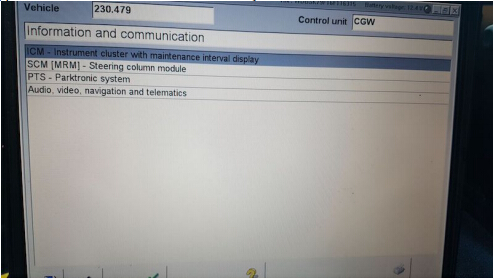
To do this, you need a MB Star diagnosticSD Connect C4with Developer mode. Hook up SD Connect diagnostic system to your car and when it reads your car, select Control Units, pick Information and Communication and you will see ICM :
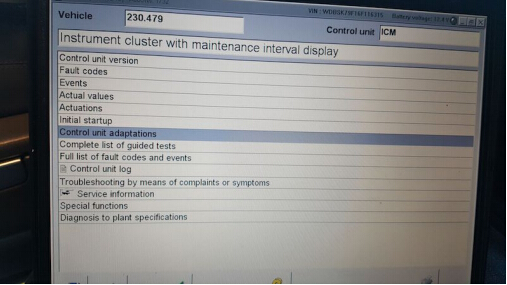
After ICM, you will see Control Unit Adaptions :
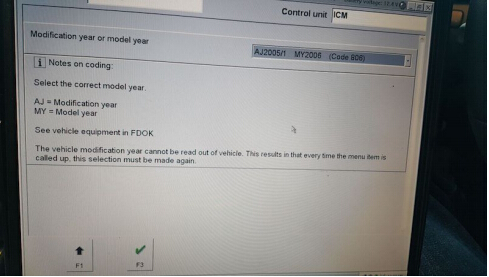
From there, choose the year of your model :
From there, select Special Equipment

Select ABC :
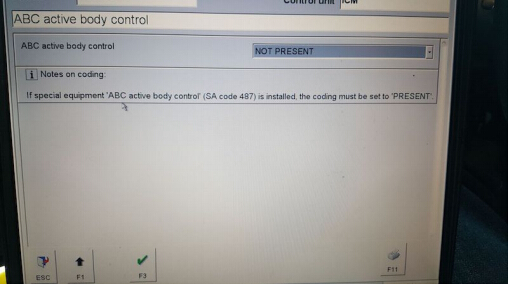
• Then go to the drop down tab and change it from PRESENT to NOT PRESENT, and click F3.
• After that, turn off the car, with the doors closed.
• Wait 1-2 mins and start the car back up (no more ABC codes and no white or red lights).
Posted by: mbbenzstar at
08:53 AM
| No Comments
| Add Comment
Post contains 159 words, total size 5 kb.
MB Star diagnosisDAS software can code out ABC, here is the example on code out Mercedes SL65.
NOTE : the instruction here only for R230s (not any W215, W216, W220, W221)
To do this, you need a MB Star diagnosticSD Connect C4with Developer mode. Hook up SD Connect diagnostic system to your car and when it reads your car, select Control Units, pick Information and Communication and you will see ICM :
After ICM, you will see Control Unit Adaptions :
From there, choose the year of your model :
From there, select Special Equipment
Select ABC :
• Then go to the drop down tab and change it from PRESENT to NOT PRESENT, and click F3.
• After that, turn off the car, with the doors closed.
• Wait 1-2 mins and start the car back up (no more ABC codes and no white or red lights).
Posted by: mbbenzstar at
08:53 AM
| No Comments
| Add Comment
Post contains 159 words, total size 5 kb.
May 29, 2017
Here is the issue and solution of how to get Xdos Xentry 17.3.5 to work fine on Mercedes C 205 when users but tried to access C 205 it says "files missingâ€.
That is, update C4 and it will work!!!
To updateSD connect C4interface, make sure you have 6xAA 1700 mAH rechargeable batteries inside which are already fully charged.
If no batteries or weak batteries, often parts of the update will fail.
If you put in non rechargeable, then there is risk of explosion!
Caution: 6xAA rechargeable batteries!!!!!!!!!
Good tips:
– How to install SD connect C4 battery:
– How update SDconnect c4 firmware:
– How to update SDconnect C4 to firmware v2.30:
http://blog.mbstartool.com/2015/08/25/instruction-for-update-and-install-v2-30-mb-sd-connect-c4-mux/
Thanks for laco210 for making important point.
Credits tohttp://www.mbstartool.com/for good instruction.
Posted by: mbbenzstar at
03:13 AM
| No Comments
| Add Comment
Post contains 137 words, total size 11 kb.
May 16, 2017
This is a W221 tutorial created for W221 owners with diesel engines.
How to change the heater booster system to a fully functional auxiliary heating system.
Tools & Stuff you need:


- Torx 20
- Wedge to leverage
- StarDiagnosis with DAS devleoper or Vediamo + Multiplexer
- Upper control panel (climate panel) with auxiliary switch
The Mercedes S-Classes (W221) with the diesel engines S320 CDI & S400 CDI are equipped as standard with an heater booster system. The heater booster switches itself on from an outside temperature of approx. 8 degrees independently and warms the cooling water, so that the engine comes faster to operating temperature. There are two types of heater booster systems: electrically operated and fuel operated. On the W221, fuel-powered heater booster were installed. These heater boosters are fully functional auxiliary heating systems from Webasto, which are only restricted in your control.
In the following course I describe what you can see, whether you have an heater booster system and what you have to convert, so that the booster can be used as a real auxiliary heater.
Standard climate switch (upper panel) without heater booster:

Cars with this switch can only use residual heat after a ride….
Climate switch (upper panel) with heater booster:

Only diesel vehicles have this switch… Heater booster turns automatically on an off, depends from the outside temperature…. You can also turn it on manually…
Climate switch (upper panel) with auxiliary heating:

This ist he switch you need to control your auxiliary heating system… Red LED turns on if the system is running… And the other LED turns yellow if you programmed a departure time…
Start the modification:

Use the wedge and fold away the two covers….

…next step turn out the two Torx screws…
….after this leap out the grid to find tha last Torx screw….

….if you have all three screws turned out, leap out the wooden modling….


As can be seen in the pictures, now disconnect both plug connections and loosen the four screws. Then simply insert the new control unit. Installation in reverse order.
Once again everything is put together, now it goes tocodingviaSD connect C4…
You have to code these three ECU:
- Central Gateway (Zentrales Gateway ZGW)
- Upper Control Panel (Oberes Bedienfeld OBF)
- Head Unit (Comand or HU221 inVediamo)
You can choose two ways for coding:


choose ecu central gateway….


…. Now follow the red arrows….


…VariantencodierungGlobale Variantenkodierung…
… now change the equipment „auxiliary heating" on available….


….. now switch tot he upper control panel and follow the red arrows….


… change the option auxiliary heating (Standheizung) to available…

… the last step ist o change the settings in ecu head unit (comand)….
…. go to adjust ecu….

… select the section „MMI controls" ….

… last step, set the „Independend Car Heating Installed" option to YES…
Now all necessary steps have been completed and you have a full-fledged auxiliary heating system. Before using, turn the ignition off and then on again.
If you now open the climate menu in the head unit, you will find a new menu item: "auxiliary heating departure time†Here you can pre-program up to three departure times. Depending on the outside temperature, the system will heat up the car for up to 50 minutes.


… new menu looks like this…..
Hints
- To ensure proper heating, the air conditioning system must be in the automatic mode and a temperature of 22 ° C must be set (see operating instructions book W221).
- The control unit for the air conditioning system will display an error in the future when reading out. The fault occurs because a valve for reducing the heating circuit is missing (heating of the room warms up a smaller cooling water circuit, the auxiliary heater warms the entire cooling water). The error has no effect on the functionality and can be ignored.
- If you are technically savvy and want to "tinkerâ€, you can also retrofit the control unit for the radio remote control in order to be able to program the heating from a distance (possibly also a Thermocall).
- BIG THANKS to the contributor Jason_Calvin from the MH community!!! THANKS A LOT.
Much success in conversion!
Posted by: mbbenzstar at
01:40 AM
| No Comments
| Add Comment
Post contains 709 words, total size 114 kb.
May 10, 2017
Some important tips of Mercedes BenzW212 7G M Mode VariantCodingusingVediamo.
Purpose:
W212 7G M Mode Variant Coding
You need:
Vediamorunning withSd connect C4
SCN coding database
Variant code:
Y2KY
The important tip-
Credits to BetaMar & StarRacer in http://mhhauto.com/Thread-W212-7G-M-Mode-Variantcoding-with-Vediamo?page=3
BetaMar
I want to have M-mode in W212 E500 4matic 2010 model 212.090 SA801 – YOM 10/1, at the moment my variant code is Y2KX, does anyone help me to know the right code for M-mode ?
StarRacer
That’s interesting. I’ve got nearly the same car (W212 from 2009) and I’m also looking for the manual mode. My variant code is Y2KY.
Someone recommended to try three codings before and after the current one but I’m a bit hesitant with this.
The coding contains several properties of the car including 4Matic or RWD. In contrast to the RWD ones, the 4Matic have a torque limitation to protect the gearbox etc. when starting with full throttle. Therefore, a genuine 4Matic variant code would be preferable.
I think in the 7G coding collection there was no W212 E500 with M-mode. The next "match†could be an S500 4Matic (221.086). From the thread mentioned its variant code is YE25. Not sure if this one has M-mode, though.
BetaMar
I want to confirm that in 212.090 with MY2010 SA801 M-mode work very well
with Y2KZ Imidietly after coding there was error showed in KI display "presafe function is unavaiable†but after ignition off/on everything works!
For 212.090 MY2009 SA800 correct coding is Y2AR
StarRacer
SUCCESS! Now with working M-mode! Y2KZ also works for me.Same error as above after first start which went away with the 2nd start.
Test drive was successful. One drawback, however: The gear switching times in M are not better than in C or S. Some years ago, I read from an S211 (E500 M273 with 7g) which was given M-mode and the owner claimed significantly faster gear switching. He did it the official way: Changing VeDoc and online SCN coding. Maybe there’s more to it than just the VGS variant coding.
Good luck
Posted by: mbbenzstar at
07:08 AM
| No Comments
| Add Comment
Post contains 349 words, total size 17 kb.
April 06, 2017
This is the how-to guide ofsd connect c4 muxIP address setup for the local area connection and wireless network connection. And it will help solve WLan Error 2 displayed on the c4 mux.
the Wlan Error2

see the screenshots


Here is a solution…tested OK by professionals.
RESET LAN & WLAN IP address as follows:
On Desktop, right click to go to Personalize

Control Panel-> Network and Internet-> Network and Sharing Center


Network Connection-> Local Area Connection 2 Properties-> Internet Protocol Version 4 (TCP/Pv4) Properties
Use the following IP address:
IP address: 172.29.127.119
Subnet mask: 255.255.255.0

Change adapter settings

Network Connection-> Wireless Network Connection 3 Properties-> Internet Protocol Version 4 (TCP/Pv4) Properties
Use the following IP address:
IP address: 192.168.2.110
Subnet mask: 255.255.255.0

Open Road24h Ad-Hoc Connector for C4 Mux
Click on -1- Make Roard24h Ad-hoc Profile, then OK

Click on -2- Connect to MUX via Road24h, then OK


Road24h now is connecting

Open Administration
SDconnect Toolkit
Information

Register/Configure
Setup Encryption: WEP/ Hex

Enter the key

Copy the key as the network security key

Start

Road14h is connected

The network location is now Work

SDconnect Toolkit Preview

It’s working!
Xentry/DAScan be used via WIFI.
Posted by: mbbenzstar at
07:23 AM
| No Comments
| Add Comment
Post contains 203 words, total size 52 kb.
30 queries taking 0.1604 seconds, 122 records returned.
Powered by Minx 1.1.6c-pink.

