



December 11, 2017
Topic
Tool option:SDconnect C4etc.
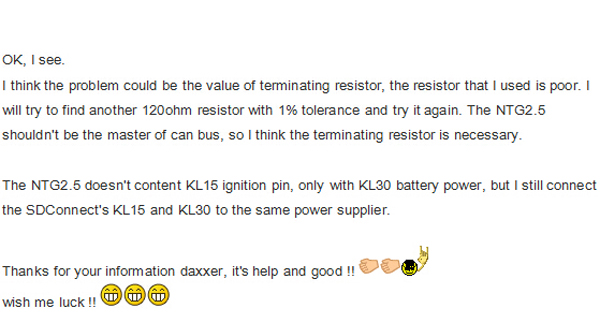
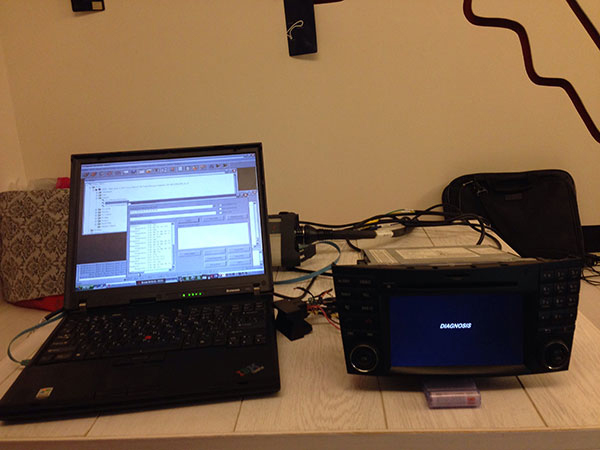
What you need to do is connect NTG2.5 with your SDConnect C4, you need to connect KL30/KL31/CAN-H/CAN-L, you don’t need to connect the ignition pin because NTG2.5 doesn’t have KL15.
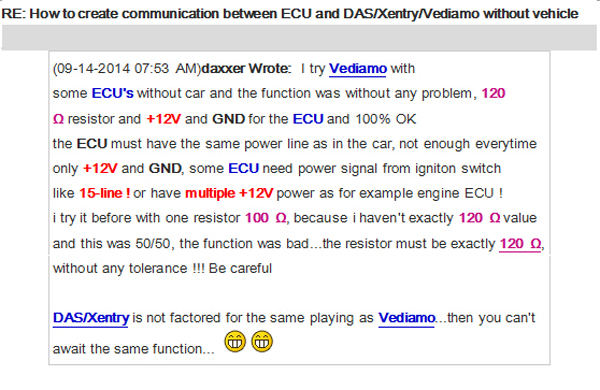
And, you need to attach a 120ohm resistor as a terminal between CAN-H and CAN-L, it’s a request
Then, if your
If you want to
Manually trigger
Just press "Rev. Cam.†item like below image in the system setting page, the rear view camera will active if you power the camera up.

On a side note: KL31 bridge
KL 31 just means the Negative Battery Terminal / Ground (I am
So just connect Pin 15 (A-Block of the Quadlock Connector) to 12V+ (KL. 30) and Pin 12 to the Ground/Negative Terminal of your power supply (KL.31). And now press the ON Button and pray it works (which works always for me)
Source:
Posted by: mbbenzstar at
03:20 AM
| No Comments
| Add Comment
Post contains 246 words, total size 13 kb.
December 08, 2017
12.2017 XENTRY/DAS Windows 7or Windows 10:
Both OK.12.2017 XENTRY OpenShell XDOS is updated and tested successfully for use. Download link:
But I don't recommend windows 10 at all at least if you don't know how to manage it
try windows 7 and I
final note, you need a good version which should not be manipulated or pre-activated
- D-A-S / Xentry2017.12....Confirmed!
- Workshop Information System (WIS net)
2017.09.... Confirmed! - Electronic Parts Catalog (EPC.net) 2017.09....Confirmed!
- Part Location Finder (ST Finder)
2008/2016.... Confirmed! - STARUTILITIES ....Confirmed!
- SDMEDIA2014....Confirmed!
- Price List
PL712016.... Confirmed!


12.2017 XDOS Activation via Startkeycenter
This is thestartkeycenterI used to activate 12.2017 Xdos with old keys. Move the folder to C:>PROGRAM FILES(x86)>MERCEDES BENZ. Launchstartkeycenterfromfolder. Insert keys
 ROGRAMFILES
Source:
Posted by: mbbenzstar at
06:55 AM
| No Comments
| Add Comment
Post contains 172 words, total size 16 kb.
December 07, 2017
12.2017 XDOS Xentry user manual:Freedownload 12.2017Xentry Diagnostics Open Shell XDOSand then install, activate/configureswon Window 7, Windows 8, Windows 10 for Mercedes diagnostic and programming.
I am just sharing what bros in forums is supposed to be about. I’m not responsible for any bad use.
Free version:
Xentry Diagnostics Open Shell XDOS 12 2017-Torrent.rar (57KB)

No password required!
NewBomb :StartKey Center Deleted on System
New Activation System Started
OLD Key & New Key is working100%
This version need 2221-45&3.91Error Fix+ DAS Blacklist Fix + DAS License 0 Fix
Windows 7-8-10 x86 systemnot SUPPORTany more
NOT TESTED BY PROFESSIONALS!TRY ONYOUR OWN RISK!!
Tested version:
Xentry Diagnostics Open Shell 12.2017 Windows 7 Windows 10:

Tested & Confirmed to workperfectwithSDconnect C4&Xentry Connect C5
12.2017 XDOS installation:
You will not able to install this version on 32-bit system only 64-bit
In level 436 system go rolling back
Note: install x86 and x64 java,enablefirewalland installation will go through
Note: if your installation is not complete..just for a simple reason:
BoschVCIrequires an X64 processor!!
Update:windows32 bit and works well (soHHTWINcan still be used)


12.2017 XDOS Windows 32 bit fix

12.2017 XDOS Configuration: via Config Assist
Looks like they have moved to the "Config Assist†like the Tab 3 instead ofStartKeyCenter..

Should be pretty easy to mod for old keys, just need the magic makers to do their thing
Very likely that in the future they want to remove SDconnect, and they will go with the new Xentry VCI

12.2017XDOS Activation: via Startkeycenter
This is the Startkeycenter I used to activate 12.2017 Xdos with old keys. Move the folder to C:>PROGRAM FILES(x86)>MERCEDES BENZ. Launchstartkeycenterfromfolder. Insert keys forxentryonly. For DAS you should move the LIC.SLI file toC
ROGRAMFILES(x86)>MERCEDES BENZ>DAS>BIN which will activate it with no timeout. Blacklist isself explanatorywhich folders they should go in. I don’t claim any of this files……
Startkeycenter
DASTIMEOUT.rar
Mercedes-BenzBLACKLIST.rar
New & Old keys working 100%:
No problems activating withnewkeys,have a look at this:

Also No problemwitholdkeys.Xdos12.2017 installed and activated …Fully working….. I even did a transmission program andscncoding on a 221. For oldkeysall you need is a modifiedstartkeycenter folder. CopytoC:\Program Files (x86)\Mercedes-Benz. After keyinstallationyou can erase folder. Ofcourseyou will need 2221-45 and 3.91 error fix, Das timeout fix and blacklist.
2221-45&3.91Error Fix:
12.2017Xdos Car List:


New cars: 118, 167GLE, 177, 238, 247B, 257, 290, P470_1, Spr907, Spr910, Vit448, V-K448

Posted by: mbbenzstar at
02:32 AM
| No Comments
| Add Comment
Post contains 399 words, total size 49 kb.
32 queries taking 0.0394 seconds, 88 records returned.
Powered by Minx 1.1.6c-pink.

