



August 31, 2016
Device:MB STAR C3 multiplexer
The extra thing have to do is:
Look at the old control unit version as shown in the picture:

Development Data ==> Control unit adaptation ==> Variant coding ==> F3
This must work as reported from many of my friends but i always do the online procedure.
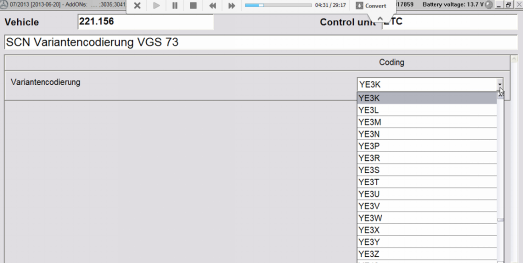
Then you will have your variant of coding.
Posted by: mbbenzstar at
02:17 AM
| No Comments
| Add Comment
Post contains 158 words, total size 3 kb.
August 30, 2016
as you can see in the image, EWA net does not recognize the symbol for Price "€" from the lists (4 languages) and put unknown symbols instead "€". If I put a comparative list from 1.2014, EWA net recognize the "€".
I edit these 5 lists and, apparently, first line with € it is the same between them
Am I "standalone"with this issue?
P.D. It doesn't matter the language list you choose, always appears what you have selected in
Then go to the menubar > encoding > encode in ANSI.
After that, replace these wrong symbols with an "€" Symbol, and save it.
Now load the file again in ewa and it should work
Posted by: mbbenzstar at
07:01 AM
| No Comments
| Add Comment
Post contains 184 words, total size 3 kb.
August 24, 2016
Here are solutions of Mercedes-Benz MB Star diagnosis EPC net open issues, including that EPC cannot display webpage and application blocked by security settings
*** Symptom 1 ***
When open EPC.net electronic parts catalogue, theInternet Explorer cannot display the webpage

Solution:
Go toStartmenu, and selectEWA, thenEWAadmintoolto start the server

Click Server, EPC, WIS one by one
Start the Offline one(s) to get it started

Restart the computer
Finally, ECP NET will be ready for use.
*** Symptom 2 ***
The following error pops up after EPC activation:
Application blocked by security settings
Name: EWA Client Tools
Location: http://localhost:9000
You security settings have blocked an application signed with an expired or not-yet-valid certificate from running

Solution:
Go toComputer->Start->Control Panel ->JAVA
Setup theSecurityas theLowest

Then you can open EPC
http://www.mbstarshop.com/service/mb-star-epc-net-not-display-blocked-by-security-settings-solved-13188.html
Posted by: mbbenzstar at
01:32 AM
| No Comments
| Add Comment
Post contains 136 words, total size 3 kb.
August 23, 2016

Xentry is in Russian and DAS in English
(ewa.net Russian too)
A similar change would be needed for DAS SIM shortcut.â€
DAS was in English and now after change the "Iru" to "Ifr" it's in French too
It's nice too!
Posted by: mbbenzstar at
03:03 AM
| No Comments
| Add Comment
Post contains 239 words, total size 3 kb.
August 20, 2016


Posted by: mbbenzstar at
06:40 AM
| No Comments
| Add Comment
Post contains 93 words, total size 3 kb.
August 17, 2016


Posted by: mbbenzstar at
05:53 AM
| No Comments
| Add Comment
Post contains 214 words, total size 12 kb.
August 15, 2016
I'm hesitant, mainly because the car (W205) is so new. There's no real need yet to do any self-service work or complex diagnostics, but I've always liked having a reasonably good knowledge of the cars I've owned. The software suite seems very comprehensive and would no doubt be a good way to learn more about the car and understand the systems, coding configurations etc.
http://www.mbstartool.com/wholesale/mb-sd-connect-compact-4-star-diagnosis-dell-d630-laptop.html
Leading up to this, it was difficult to determine whether it would be valuable enough to buy, since finding reviews out there proved quite difficult. There are also a plethora of online vendors selling kits, hardware and software, which confuses the potential buyer even more so. Anyway, I thought I'd write up a quick review summary of my own experience in purchasing a full diagnostics kit - especially in reference to the W205.
What's it like, what do you get, what can you do, etc... so here we go, my take on the full diag suite - get a big glass or wine (or beverage of choice) and settle in for what is hopefully and enjoyable and informative read.
1. What is it?
This kit is a full Mercedes Benz diagnostics system. In a nutshell the components of afull kitcomprise:
The one thing you do get quite nicely with a kit like this is, out of the box plug-in and go functionality. No mucking around loading software, stressing over setups, keys etc. You buy, you get, you use. Simple.
2. Where do I buy it?
Well.. duh, the internet of course - just making sure you don't go into your local MB dealership asking for a kit .. you know.
Who do you buy it from? .. that I cannot fully answer, since I purchased my first kit and hence have no relevant comparisons to draw. Arguably the Chinese are the No.1 player in this market. They are the ones who clone the hardware and are certainly the prominent purveyors of such kits at a price point which suits the average punter.
One thing I do suggest is that youstrike up a conversation with your potential vendor of choice before handing over your credit card. Unless you speak fluent Mandarin or Cantonese, it's handy to know that your vendor will be able to understand your questions in relation to support/warranty or other things (and believe me, you will have questions!).
The second main point is todetermine how reliable you feel the vendor is. I know it's difficult to judge. Nobody knows who's who on the internet. My guiding principles were to look at vendors who had an established track record in terms of their web presence and had reviews stretching back several years. Anyway, enough said on that - do your research and don't just go looking for the cheapest price.
So once your order is placed, a very short time later you will receive a nice brown box like this:


3. The Computer (Dell Latitude D630)
The computer of choice for most vendors is a Dell Latitude D630. There are other options out there but this is by far the most common. Also on sale with most vendors is a Dell630 hard drive which is obviously the favored option if you already have a laptop to suit.
Note that the original computer equipment which MB Techs use are based on Panasonic hardware I believe (e.g. Toughbook), providing a touch screen interface. So this begs the question - why the antiquated Dell hardware? I don't have a full answer but what I have determined is that it's large due to historic dependencies. The Dell 630 was used for a long time due to the fact that it had a real serial RS232 serial COM port. With the previous generation of multiplexer units you needed that port.
With the advent of wireless and network cable connections to the multiplexer units, there's no longer a reliance on the RS232 port and hence you can now find sellers who use IBM machines or
4. The SD connect C4 Multiplexer
"What's a multiplexer" I hear you mutter .. well, I'm glad you asked. The SDconnect is the communications interface between the car and the diagnostic computer system (i.e. the Dell). The unit sends fault detection data to the host computer and instructions back to the vehicle. In basic terms, it's a tool that enables the diagnostic technician to examine vehicle functions, perform data coding and update vehicle software. It knows the communications protocols which the car utilizes to talk to the outside world. Like wow man! (hang on, I need to spin the propeller on my cap). Now, let's carry on.
The SDConnect 4 is the previous generation multiplexer used on Mercedes vehicles. It is now superseded by the SD connect C5 and although they are starting to appear in cloned form, the c4 is still one of the most prominent cloned multiplexers out there. You can buy a C5 multiplexer if you wish (and for certain new hybrids vehicles you may have to), but for most W205 variants the C4 will do just fine. The SDconnect 4 is wireless enabled (via a plugin card; note not all vendors will sell it with this included, so buyer beware) or it can be connected via a network cable.


On the opposite side you will see the RJ45 network port for connecting your diagnostics computer (seen below on left with grey flip cover) and the MB proprietary cable connect (on right) which goes to the vehicle. For the W205, you will only need the OBD cable. The kit however comes with cables to suit all older style cars, trucks etc. as well.

Top of the unit has a backlit LCD display, two LED indicators, and four buttons. The LCD indicates Power Supply status, Connection Type, and Working Status. The LEDs are used to indicate a variety of working status signals and the buttons give you the option to bring up information about vehicle or device battery status, display network addresses, put the unit into standby and so forth.
Essentially there is not much that the unit does on its own; not even an OBD scan or the like. It needs to be connected to the car and a computer to represent any value.
5. TheSoftware
Now this is where the fun and games really start. Boot up your laptop and you're soon presented with a Windows XP OS, which has obviously been customized to the Mercedes Software installed on the device. An early indication of that is the taskbar which prominently displays connectivity between the computer, the multiplexer and associated networks (e.g. internet/server) in the lower right of screen.
There is a lot to learn here for newcomers. The software changes very regularly (sometimes monthly) to keep up with the latest developments. Not surprisingly the vendors from China seem to have their finger on the pulse quite well in that regard. My kit contained December 2015 versions. I don't think there's any need for concern with constant updates however. If you can diagnose your car with the modules on-board then you're good to go. The Workshop info will probably be one of the benefactors of regular updates but most of that service info is already in abundance, as you will see later.

I also will not go into the various configuration software components, such as installation, authentication, key security, registration, connectivity and so forth. If you are curious, feel free to PM me or do some Googling on the net because there is adequate information out there if you're willing to look for it.
Let's look at the main sub components to the suite that are of interest to us:
Not to be confused with XENTRY DAS (Diagnosis Assistance System; which was predominantly used with older vehicles - I think up to the W204). This is the primary diagnostic suite for the vehicle and probably the main software you would tend to use with a car like the W205.
Xentry allows you to delve into each control unit of your vehicle and see configuration data as well as run a very large number of diagnostic tests. It provides you with an exceptionally comprehensive diagnostic tool to see exactly what the various systems of the vehicle are doing.
What is exceptionally nice is that XENTRY also provides you with a full troubleshooting workflow; meaning that once you have run a test, found a fault, you can then delve straight into relevant maintenance references and associated documentation.
I've always owned workshop maintenance books for my vehicles, but have to say this system is by far the most well thought out and comprehensive. Not so say it doesn't have it's quirks, but it is not overly difficult to come to terms with.
This is an intranet web server that hosts two important applications:
A comprehensive listing of all vehicle parts; broken down into sub systems. It allows you to quickly build shopping lists of components (e.g. when needed for repair).
An extremely comprehensive web information system which details the functional components of the car (categorized into sub systems again). It also comes with workshop instructions for performing almost every type of maintenance task, maintenance bulletins and a free set of steak knives.
The WIS is also equipped with several sub-application modules, which although not doubt hold lots of value in a workshop context, are otherwise uninteresting for an amateur user:
This is an Access database for Mercedes Benz European parts pricing - equal parts scary and interesting!
What can you do?
So what's possible with a kit like this, you ask. You would see by now, that the software will provide you with an astonishing array of information to come to terms with. I won't say the possibilities are endless, but they are certainly vast.
From a learning perspective - you have everything you could wish for. Theoretically you could be satisfied with a copy of the WIS alone, since that serves as probably the most comprehensive learning tool for the vehicle.
From a diagnostics perspective - you will be satisfied with multiplexer and XENTRY. The range of tests which you can run and actuations you can trigger will let you fully examine each part of the car. You can generate detailed test reports, seeing when faults occurred exactly in each of the computer modules - and believe me, there are a lot of those. The W205 has upwards of 50 control units with each of those capable of logging and tracing out detailed errors and fault finding.
From a configuration (Adaptations) aspect, there are some minor things (often referred to as 'Teach-in processes') possible (e.g. Airmatic level calibration) but it isn't a treasure trove for those willing to tinker with the vehicle (see next topic). One aspect I also didn't delve into further within this review is that you can also configure and update module software from within XENTRY (a process called SCN Coding) which is only available online for the W205 (i.e. you need an authorized Mercedes user account to do so). There are Chinese vendors who will sell you a 'session' for online SCN, but it can get expensive quite quickly. In reality it is not something you would do other than to perform major update tasks (e.g. after replacing an ECU or other module) if the car was outside of warranty.
7. What can't you do?
If you're looking at ways to change significant default behaviors in the W205 vehicle systems (e.g. allow Video in motion, disable your start-stop, change variant codes etc. ) then you will probably be disappointed. MB has gone to some length to ensure that certain changes are extremely difficult to achieve. Offline coding was to a large extend abandoned with the W204 to guard against incorrect configurations. That's not to say there isn't a way, rather that these lock-downs are probably in place to avoid introducing configuration errors inadvertently during maintenance or by amateurs who don't know what they're doing.
There are more extensive changes possible with a software product called Vediamo, which is a factory tool used to perform complex black magic best not brought up in this review (makes sign of the cross; heck I'm not even religious!). Regardless of your skills in Vediamo, my research and impression leads me to believe that most changes also require Online SCN coding, which leaves you with little room to achieve known outcomes. Given that people do like to tinker or hack technology I'm sure this topic will become somewhat irrelevant in the future. Yes, people will find a way - whether that's a good or a bad thing, I shall not judge.
8. Conclusions
So.. your glass of wine is empty and you're wondering "What the the heck did I just read that for!). If you were to ask me again "Is it worth purchasing a kit like this for your car?" I would offer you an unreserved "Yes" - although with a disclaimer.
If you are the type of person who shows an interested in learning the in's and out's of your vehicle, then I can't think of a better way than to own one of these setups. There is such a vast amount of content and useful reference material that it serves as a valuable library to learn more. Whether your goal is to perform self-maintenance, troubleshoot issues or simply to see for yourself what is going on inside of your vehicle, then this is without a doubt the toolset which allows you to do so.
If on the other hand you would prefer to say "here you go - fix it", or perhaps rather be 'told what's wrong' with your car, rather than 'know what's wrong', perhaps you're better off saving your dollars for other toys.
The W205 is undoubtedly a computerized marvel on wheels. Many of the systems and technical aspects of the car are completely obfuscated from the regular plebs like us. A diagnostic kit such as this certainly allows you to delve under the covers and go as deep as your curiosity wants.
Posted by: mbbenzstar at
02:34 AM
| No Comments
| Add Comment
Post contains 3153 words, total size 25 kb.
August 09, 2016
Error message:
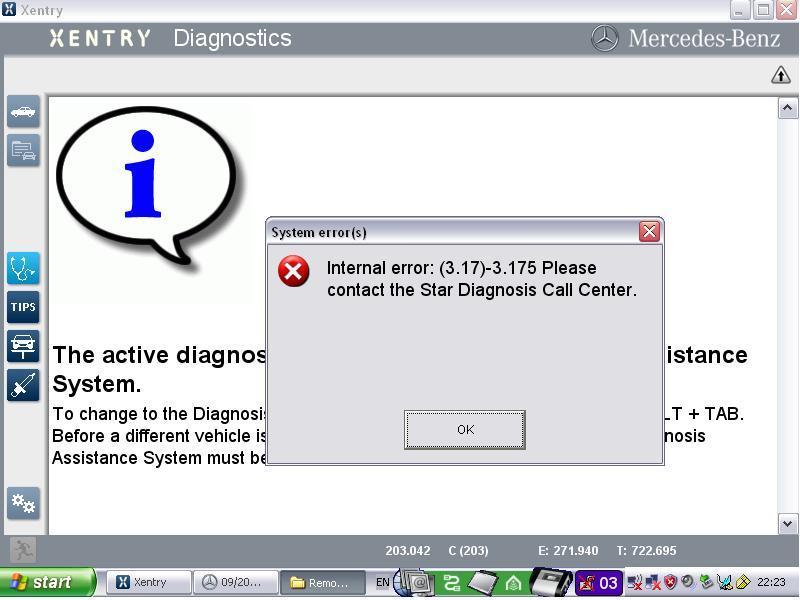
this error only appears when your lic_key_2.dat file is marked read only.. but if you have to have your laptop connected to the internet (like I require for work) then when not set read only,Xentrydeletes the contents of this file requiring you to reenter your key every time you run Xentry.
Posted by: mbbenzstar at
08:41 AM
| No Comments
| Add Comment
Post contains 178 words, total size 3 kb.
August 03, 2016
It canprogram pretty muchanything on a car.
You need a STAR Diagnostic tool to use Vediamo, doesn't seem like you know much about it so I figured I'd add that.
Spend some time looking around on the internet for a download link for it, you'll also need to have it activated with your hardware ID, etc.
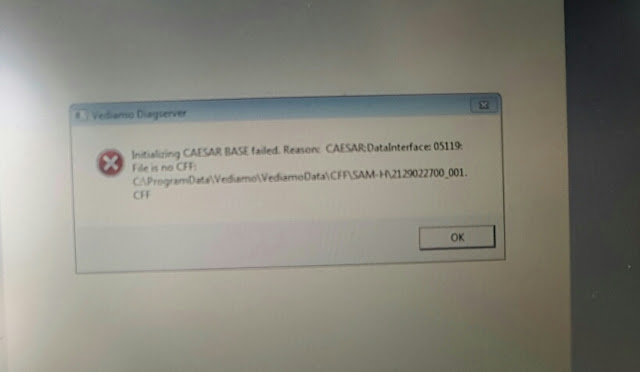
- Got two error messages pops up when downloaded this program running on the Win 7 Pro the other Win 7 Home.


- What do I have to change in the system configuration to use it with a SD connect Compact 4? or is everything set by the installation of vediamo?
- Which CBF files should be used with Vediamo in Xentry I found already the Xentry/DAS CBF files but in one post I read that they are different available for vediamo which give more possibilities in porgramming the ECUs.
Which additional possibilies have these "special" CBF files?
-> you need touse factory CBF, those cbf from xentry folder will do nothing to your coding
Posted by: mbbenzstar at
05:50 AM
| No Comments
| Add Comment
Post contains 437 words, total size 6 kb.
August 02, 2016
1.WinLicense error


Posted by: mbbenzstar at
03:21 AM
| No Comments
| Add Comment
Post contains 114 words, total size 2 kb.
August 01, 2016
vehicles: PKW/SMART
Software: Xentry XP, XDOS(32/64) and Xentry Pass-Thru (32/64)
Release: 2015 until 07-2016.
- i don't password it because it is for educational only.
- do at your own risk
- no support but if i get your valuable feedback, i will try to fix it if i could.
- you can't combine with online capabilities of the latest xdos. better make a batch file to switch between offline and online.
it is simple because it is only one folder..
- copy your original das\trees\pkw\flashen and rename to e.g: flashenOnline
- extract the offline patch to the flashen folder
1. flashen (with offline capability)
2. flashenOnline which is the original
- for some xdos release, there is no akttab.csv in the PKW sdflash folder
Posted by: mbbenzstar at
01:56 AM
| No Comments
| Add Comment
Post contains 212 words, total size 3 kb.
32 queries taking 0.0549 seconds, 104 records returned.
Powered by Minx 1.1.6c-pink.

