



May 30, 2017
MB Star diagnosisDAS software can code out ABC, here is the example on code out Mercedes SL65.
NOTE : the instruction here only for R230s (not any W215, W216, W220, W221)
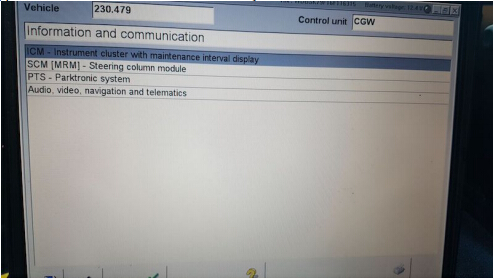
To do this, you need a MB Star diagnosticSD Connect C4with Developer mode. Hook up SD Connect diagnostic system to your car and when it reads your car, select Control Units, pick Information and Communication and you will see ICM :
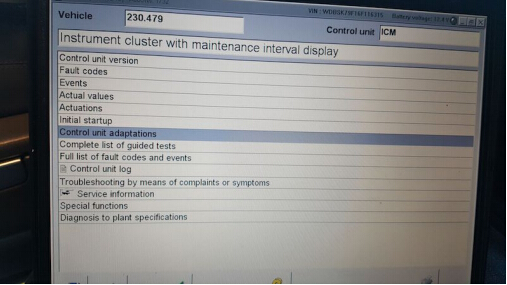
After ICM, you will see Control Unit Adaptions :
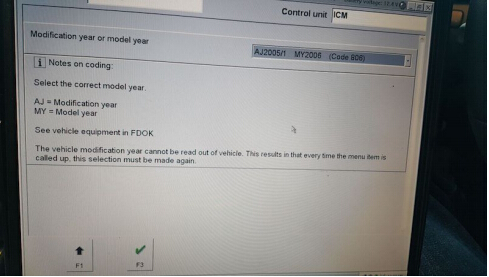
From there, choose the year of your model :
From there, select Special Equipment

Select ABC :
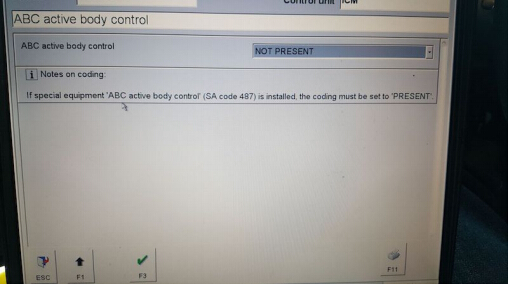
• Then go to the drop down tab and change it from PRESENT to NOT PRESENT, and click F3.
• After that, turn off the car, with the doors closed.
• Wait 1-2 mins and start the car back up (no more ABC codes and no white or red lights).
Posted by: mbbenzstar at
08:53 AM
| No Comments
| Add Comment
Post contains 159 words, total size 5 kb.
MB Star diagnosisDAS software can code out ABC, here is the example on code out Mercedes SL65.
NOTE : the instruction here only for R230s (not any W215, W216, W220, W221)
To do this, you need a MB Star diagnosticSD Connect C4with Developer mode. Hook up SD Connect diagnostic system to your car and when it reads your car, select Control Units, pick Information and Communication and you will see ICM :
After ICM, you will see Control Unit Adaptions :
From there, choose the year of your model :
From there, select Special Equipment
Select ABC :
• Then go to the drop down tab and change it from PRESENT to NOT PRESENT, and click F3.
• After that, turn off the car, with the doors closed.
• Wait 1-2 mins and start the car back up (no more ABC codes and no white or red lights).
Posted by: mbbenzstar at
08:53 AM
| No Comments
| Add Comment
Post contains 159 words, total size 5 kb.
May 29, 2017
Here is the issue and solution of how to get Xdos Xentry 17.3.5 to work fine on Mercedes C 205 when users but tried to access C 205 it says "files missingâ€.
That is, update C4 and it will work!!!
To updateSD connect C4interface, make sure you have 6xAA 1700 mAH rechargeable batteries inside which are already fully charged.
If no batteries or weak batteries, often parts of the update will fail.
If you put in non rechargeable, then there is risk of explosion!
Caution: 6xAA rechargeable batteries!!!!!!!!!
Good tips:
– How to install SD connect C4 battery:
– How update SDconnect c4 firmware:
– How to update SDconnect C4 to firmware v2.30:
http://blog.mbstartool.com/2015/08/25/instruction-for-update-and-install-v2-30-mb-sd-connect-c4-mux/
Thanks for laco210 for making important point.
Credits tohttp://www.mbstartool.com/for good instruction.
Posted by: mbbenzstar at
03:13 AM
| No Comments
| Add Comment
Post contains 137 words, total size 11 kb.
May 16, 2017
This is a W221 tutorial created for W221 owners with diesel engines.
How to change the heater booster system to a fully functional auxiliary heating system.
Tools & Stuff you need:


- Torx 20
- Wedge to leverage
- StarDiagnosis with DAS devleoper or Vediamo + Multiplexer
- Upper control panel (climate panel) with auxiliary switch
The Mercedes S-Classes (W221) with the diesel engines S320 CDI & S400 CDI are equipped as standard with an heater booster system. The heater booster switches itself on from an outside temperature of approx. 8 degrees independently and warms the cooling water, so that the engine comes faster to operating temperature. There are two types of heater booster systems: electrically operated and fuel operated. On the W221, fuel-powered heater booster were installed. These heater boosters are fully functional auxiliary heating systems from Webasto, which are only restricted in your control.
In the following course I describe what you can see, whether you have an heater booster system and what you have to convert, so that the booster can be used as a real auxiliary heater.
Standard climate switch (upper panel) without heater booster:

Cars with this switch can only use residual heat after a ride….
Climate switch (upper panel) with heater booster:

Only diesel vehicles have this switch… Heater booster turns automatically on an off, depends from the outside temperature…. You can also turn it on manually…
Climate switch (upper panel) with auxiliary heating:

This ist he switch you need to control your auxiliary heating system… Red LED turns on if the system is running… And the other LED turns yellow if you programmed a departure time…
Start the modification:

Use the wedge and fold away the two covers….

…next step turn out the two Torx screws…
….after this leap out the grid to find tha last Torx screw….

….if you have all three screws turned out, leap out the wooden modling….


As can be seen in the pictures, now disconnect both plug connections and loosen the four screws. Then simply insert the new control unit. Installation in reverse order.
Once again everything is put together, now it goes tocodingviaSD connect C4…
You have to code these three ECU:
- Central Gateway (Zentrales Gateway ZGW)
- Upper Control Panel (Oberes Bedienfeld OBF)
- Head Unit (Comand or HU221 inVediamo)
You can choose two ways for coding:


choose ecu central gateway….


…. Now follow the red arrows….


…VariantencodierungGlobale Variantenkodierung…
… now change the equipment „auxiliary heating" on available….


….. now switch tot he upper control panel and follow the red arrows….


… change the option auxiliary heating (Standheizung) to available…

… the last step ist o change the settings in ecu head unit (comand)….
…. go to adjust ecu….

… select the section „MMI controls" ….

… last step, set the „Independend Car Heating Installed" option to YES…
Now all necessary steps have been completed and you have a full-fledged auxiliary heating system. Before using, turn the ignition off and then on again.
If you now open the climate menu in the head unit, you will find a new menu item: "auxiliary heating departure time†Here you can pre-program up to three departure times. Depending on the outside temperature, the system will heat up the car for up to 50 minutes.


… new menu looks like this…..
Hints
- To ensure proper heating, the air conditioning system must be in the automatic mode and a temperature of 22 ° C must be set (see operating instructions book W221).
- The control unit for the air conditioning system will display an error in the future when reading out. The fault occurs because a valve for reducing the heating circuit is missing (heating of the room warms up a smaller cooling water circuit, the auxiliary heater warms the entire cooling water). The error has no effect on the functionality and can be ignored.
- If you are technically savvy and want to "tinkerâ€, you can also retrofit the control unit for the radio remote control in order to be able to program the heating from a distance (possibly also a Thermocall).
- BIG THANKS to the contributor Jason_Calvin from the MH community!!! THANKS A LOT.
Much success in conversion!
Posted by: mbbenzstar at
01:40 AM
| No Comments
| Add Comment
Post contains 709 words, total size 114 kb.
May 10, 2017
Some important tips of Mercedes BenzW212 7G M Mode VariantCodingusingVediamo.
Purpose:
W212 7G M Mode Variant Coding
You need:
Vediamorunning withSd connect C4
SCN coding database
Variant code:
Y2KY
The important tip-
Credits to BetaMar & StarRacer in http://mhhauto.com/Thread-W212-7G-M-Mode-Variantcoding-with-Vediamo?page=3
BetaMar
I want to have M-mode in W212 E500 4matic 2010 model 212.090 SA801 – YOM 10/1, at the moment my variant code is Y2KX, does anyone help me to know the right code for M-mode ?
StarRacer
That’s interesting. I’ve got nearly the same car (W212 from 2009) and I’m also looking for the manual mode. My variant code is Y2KY.
Someone recommended to try three codings before and after the current one but I’m a bit hesitant with this.
The coding contains several properties of the car including 4Matic or RWD. In contrast to the RWD ones, the 4Matic have a torque limitation to protect the gearbox etc. when starting with full throttle. Therefore, a genuine 4Matic variant code would be preferable.
I think in the 7G coding collection there was no W212 E500 with M-mode. The next "match†could be an S500 4Matic (221.086). From the thread mentioned its variant code is YE25. Not sure if this one has M-mode, though.
BetaMar
I want to confirm that in 212.090 with MY2010 SA801 M-mode work very well
with Y2KZ Imidietly after coding there was error showed in KI display "presafe function is unavaiable†but after ignition off/on everything works!
For 212.090 MY2009 SA800 correct coding is Y2AR
StarRacer
SUCCESS! Now with working M-mode! Y2KZ also works for me.Same error as above after first start which went away with the 2nd start.
Test drive was successful. One drawback, however: The gear switching times in M are not better than in C or S. Some years ago, I read from an S211 (E500 M273 with 7g) which was given M-mode and the owner claimed significantly faster gear switching. He did it the official way: Changing VeDoc and online SCN coding. Maybe there’s more to it than just the VGS variant coding.
Good luck
Posted by: mbbenzstar at
07:08 AM
| No Comments
| Add Comment
Post contains 349 words, total size 17 kb.
32 queries taking 0.0434 seconds, 92 records returned.
Powered by Minx 1.1.6c-pink.

