



August 23, 2016
How to Change DAS Xentry Russian language to French
http://mbsdconnect4.blogspot.com/2016/08/change-das-xentry-language-to-french.html
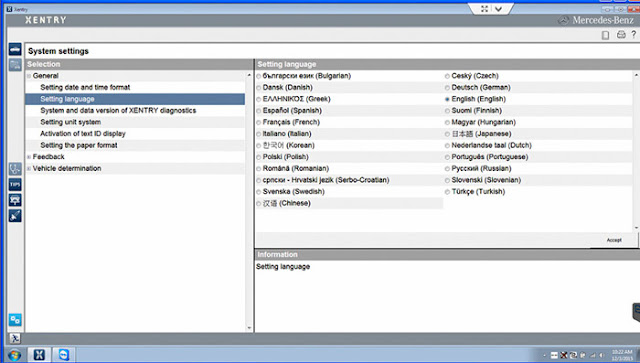
Here is the customer solution to Mercedes-Benz MB Star diagnosis Xentry/DASlanguage change (Russian to French)...

Actually, i can't change the language of das/xentryat the beginning:
Xentry is in Russian and DAS in English
(ewa.net Russian too)
Xentry is in Russian and DAS in English
(ewa.net Russian too)
i first checked if ihave the complete language pack installed, because if not i wouldn’t have all the data for other languages.
Then i was told that:
"If you right click the DAS icon on your desktop and select "properties", at the Target line you can read "-lru" where "ru" refers to Russian language. If you change this to "en" (I think gb works too), you will have DAS in English. If you want some other language, you can find the list of language codes from the forum.
A similar change would be needed for DAS SIM shortcut.â€
A similar change would be needed for DAS SIM shortcut.â€
Follow the tips, i made it.
Xentry was in Russian and now after change language in settings is in French
DAS was in English and now after change the "Iru" to "Ifr" it's in French too
It's nice too!
DAS was in English and now after change the "Iru" to "Ifr" it's in French too
It's nice too!
But in Das, i had all " é " replaced by a Russian letter i don't have in my keyboard it's look like an " N " inside out.
Checked Windows Regional settings... The keyboard was set to some Russian mode.
Now it's in French mode and it's ok
The French Xentry/DAS works like a charm!
Posted by: mbbenzstar at
03:03 AM
| No Comments
| Add Comment
Post contains 239 words, total size 3 kb.
15kb generated in CPU 0.0195, elapsed 0.0461 seconds.
35 queries taking 0.0335 seconds, 88 records returned.
Powered by Minx 1.1.6c-pink.
35 queries taking 0.0335 seconds, 88 records returned.
Powered by Minx 1.1.6c-pink.

